

I've recently been playing Retro Rewind - Video Store Simulator. Its official Chinese interface is available in Traditional Chinese, but Simplified Chinese is not listed on the Steam store page.
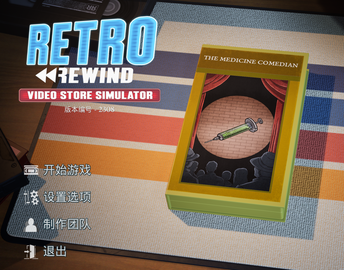
This community patch is for players who prefer Simplified Chinese. It converts the game's UI and some predefined on-screen text, as shown below.
How to install
- Download the archive from the Quark Netdisk share. The download page is in Chinese.
- Extract the archive to obtain
RetroRewind_ZhHans_P.pak. - Open the game's installation folder and place that file in this subfolder:
RetroRewind\Content\Paks
- Start the game, open its language settings, select 简体中文 — Simplified Chinese, and save.
What the patch covers
The result is a partial Simplified Chinese localization. Some game elements cannot be changed through this method, so the patch cannot translate everything. It covers the UI and the text elements that can be adjusted; other content may remain in its original form.
Translated from the original Chinese patch announcement, published on October 20, 2026. The filename, installation path and download link are preserved from the original.
Comments NOTHING