

My AI bot was getting a lot of use, so I put together a quota plugin for AstrBot. It counts model requests per user and ties Telegram usage to the user’s Telegram ID, letting you set both a five-hour quota and a weekly quota. If you run a public AI service through Telegram, it gives you a straightforward way to control how much each person can use it.
Repository: xmlans/astrbot_plugin_usage_limiter.
Installing the plugin
In AstrBot’s plugin marketplace, search for 双周期对话额度. That is the plugin’s Chinese display name, roughly “dual-period conversation quota.” Download and install it through the plugin manager.
You can also install using the repository URL above, as described in the project’s README. The current release requires AstrBot 4.0.0 or later and has no additional runtime dependencies.
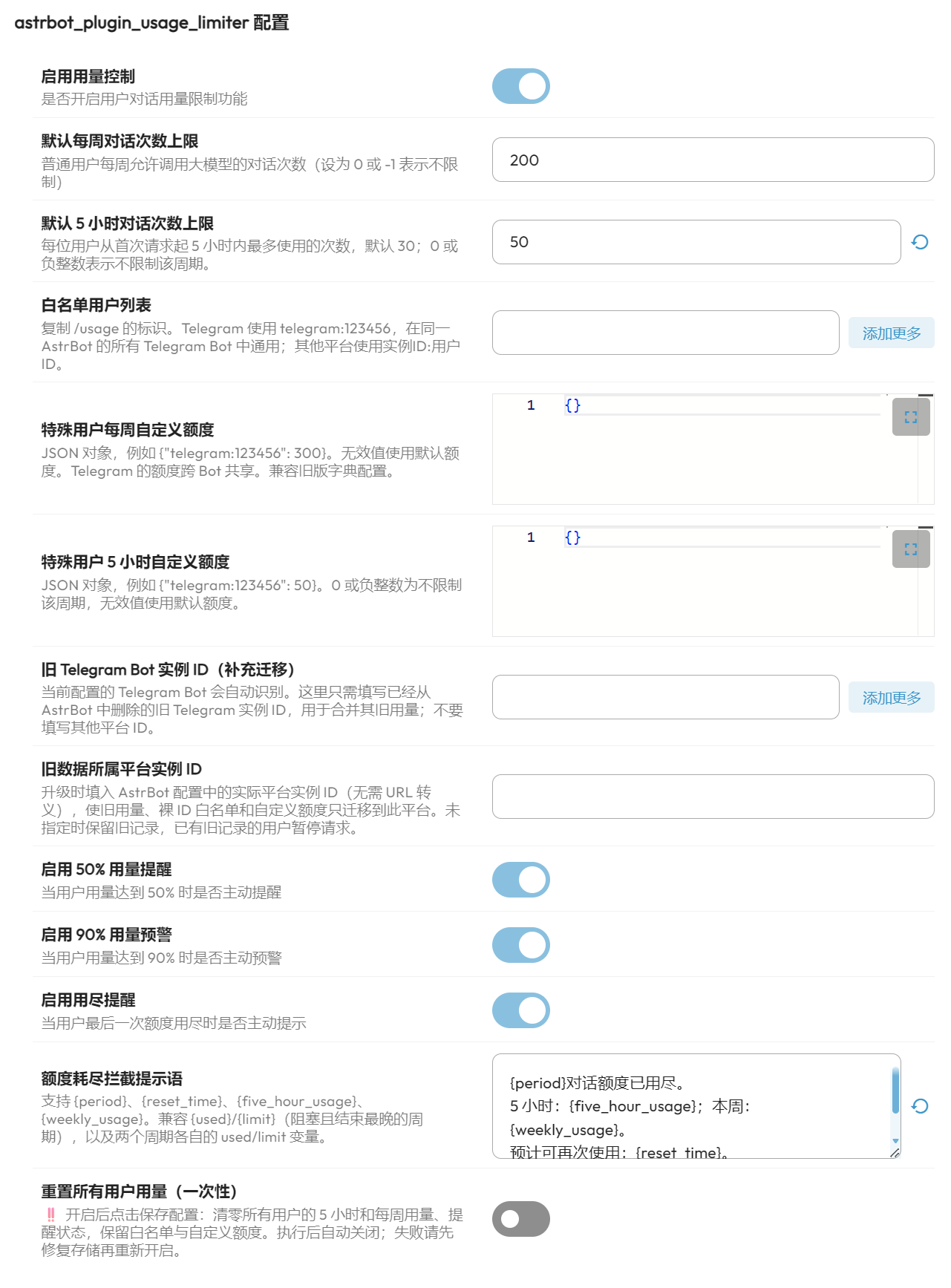
What you can configure
The settings page lets you choose default five-hour and weekly request limits for all users, then give individual users different allowances through JSON overrides. The defaults apply to each user; they are not a single shared pool for the whole bot.
The current defaults are 30 requests per five-hour window and 200 per week. The screenshot shows my five-hour setting changed to 50.
Telegram users have an identifier such as telegram:123456. Within the same AstrBot instance, that person’s quota is shared across its Telegram bots, including private and group chats. Separate servers do not automatically share counters. Send /usage to your bot to see your full identifier, usage, remaining allowance and reset times.
For example, put this object in the WebUI’s weekly custom-quota field, custom_limits:
{"telegram:123456": 300}
And use this in the five-hour field, custom_5h_limits:
{"telegram:123456": 50}
Replace the example identifier with the one shown by /usage. You can also use the whitelist for users who should be exempt from limits.
Resets and usage notices
There is a one-time reset switch on the configuration page. Enable reset_all_usage and save the configuration to clear all users’ five-hour and weekly usage and notice states while keeping their quota settings and whitelist entries. The switch turns itself off after use. The Chinese post’s reference to a monthly reset is corrected here to match the current implementation.
You can independently enable or disable notices at 50%, 90% and 100% of either quota, so users know when they are approaching or reaching the limit.
The five-hour window starts with a user’s first permitted model request. The weekly counter resets on Monday at 00:00 in the server process’s local time zone. The two periods are independent: using up either allowance pauses further requests until the relevant quota becomes available again.
One implementation detail matters for interpreting “usage”: a request reaching AstrBot’s on_llm_request hook consumes one count in each limited period before the model runs. A later model failure does not automatically refund it. This is request counting, rather than token or monetary-cost accounting; calls that bypass that hook are outside the plugin’s scope.
Translated from the original Chinese article, published October 24, 2026. Configuration names and behavior were checked against the repository’s README, configuration schema and source code.
Comments NOTHING