

DeepSeek Harness is an agent runtime with a desktop interface and a growing plugin ecosystem. After using it for a few days, I found it approachable for office tasks such as presentation creation as well as coding. If Claude Code feels difficult to get started with, this is another option to explore; Tencent WorkerBuddy is another product mentioned in my original notes.
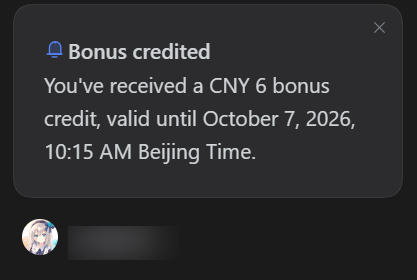
The September 2026 promotion described in the Chinese post offers RMB 6 in API credit to eligible first-time desktop users who sign in with a DeepSeek account. The credit expires after China's National Day holiday. Check the actual expiry and eligibility shown in your account; this is a temporary promotion, not a permanent free tier.
Install the desktop app
- Visit the official DeepSeek Harness download page, download the installer for your system, and install it.
- Sign in with your DeepSeek account through the browser login flow. If eligible, the promotional credit should appear in your account.
- Choose the work or coding setup that fits your needs. Harness supports third-party model APIs, so you can configure another provider rather than using only DeepSeek models.
Add plugins
Open the plugin area in the upper-left corner. The original setup enables the agent teams, automatic authorization review, and automation modules. Choose modules according to the tasks you plan to run and review the permissions of plugins before enabling them.
Browse the DSH Market plugin catalog. You can also open Add Plugin in Harness and use the marketplace command:
dshmarketClick your avatar and open Settings to find the plugin marketplace. For me, the graphical setup is easier to get into than a command-line-only workflow.
Adapted from the original Chinese article, published on September 30, 2026.
Comments NOTHING