

If you have a reasonably capable gaming PC, you can try running an AI companion locally. This guide uses my desktop as its reference: an RTX 4070 Super with 12 GB of VRAM and 32 GB of system RAM. A well-equipped laptop may also work.
On this setup, I used deepseek-r1:32b. The 32B suffix refers to the model's parameter count. Smaller models, such as a 14B Qwen model, are another option for character chat and romantic role-play.
Performance on my setup was roughly 1–3 Chinese characters per second, with heavy memory use. This is an account of my own configuration, rather than a guaranteed speed for every PC. Larger models and longer contexts need more memory.
Install Ollama and download a model
Download and install the Windows version of Ollama. Leave several dozen gigabytes of free disk space for the model. Open Command Prompt or PowerShell and run:
ollama run deepseek-r1:32bOllama downloads the model and then opens an interactive chat. To leave that chat, enter:
/byeCreate a character prompt
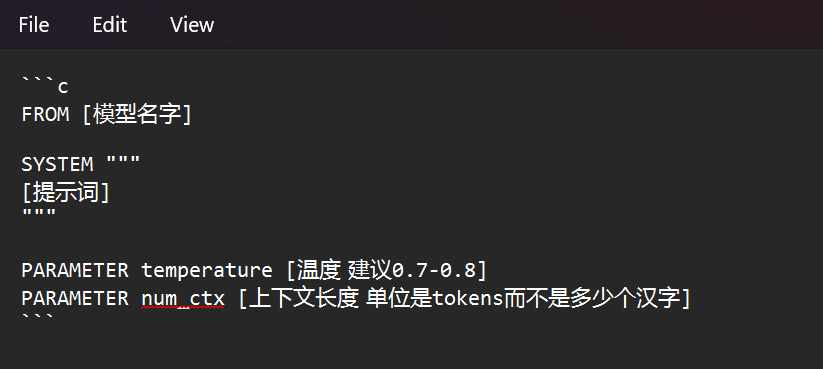
Create a plain-text file named prompts. Make sure your editor does not silently add a .txt extension. Add the following Modelfile content:
FROM deepseek-r1:32b

SYSTEM """
You are a cheerful catgirl character. Stay in character during role-play.
End every reply with "meow~".
"""

PARAMETER temperature 0.7
PARAMETER num_ctx 8192
FROM selects the model you downloaded. Change it if you are using a different model. SYSTEM contains the instructions that establish your character's personality and response style.
You can write your own prompt or start from our system-prompt repository. The example above is an English adaptation of the original character prompt.
I use a temperature around 0.7–0.8. Lower values generally make responses more predictable; higher values introduce more variation. Values above 1 can also make the model less consistent.
num_ctx sets the context size. I chose 8192 tokens to keep memory demands manageable. A very long character prompt takes up part of that space, leaving less room for the conversation.
Create and run your companion
Open a terminal in the folder containing prompts, then run:
ollama create nya-r1 -f promptsYou can replace nya-r1 with your preferred local model name. Start the resulting character model with:
ollama run nya-r1The model will now use your character instructions. Running locally gives you control over the configuration and avoids depending on a hosted chat platform for each reply. The tradeoffs on this hardware are slow output and a smaller model than many hosted frontier services offer.
Configuration reference: Ollama Modelfile documentation.
Adapted from the original Chinese article, published on September 21, 2026.
Comments NOTHING