

After the usage-limit plugin I introduced recently, here is another small AstrBot plugin I wrote around the same time. It is mainly for bots shared by several people: users can set their own prompts without the administrator repeatedly editing AstrBot’s shared persona settings.
The plugin has only been tested on Telegram.
Three commands
| Command | What it does |
|---|---|
/prompt |
Start adding or changing your prompt |
/prompt show |
Show your current prompt |
/prompt clear |
Clear your prompt and leave prompt-entry mode |
Send /prompt, wait for the bot’s request, then send your complete prompt as a separate message. Multiline text is supported. You have five minutes to send it; after that, send /prompt again to restart. Once the bot confirms it has saved the prompt, resume chatting normally.
The prompt applies only to that user’s requests in the current conversation. Starting a new conversation does not inherit it, and another user’s prompt is kept separate. The plugin adds it to the model request without changing the shared persona.
Installing it
Source repository: xmlans/astrbot_plugin_user_prompts.
In AstrBot’s plugin marketplace, search for 用户提示词, the Chinese display name meaning “user prompts,” and install it through the plugin manager. The README also describes installation by entering the repository URL on AstrBot’s plugin-management page. The current metadata declares support for AstrBot 4.x (>=4.0.0,<5).
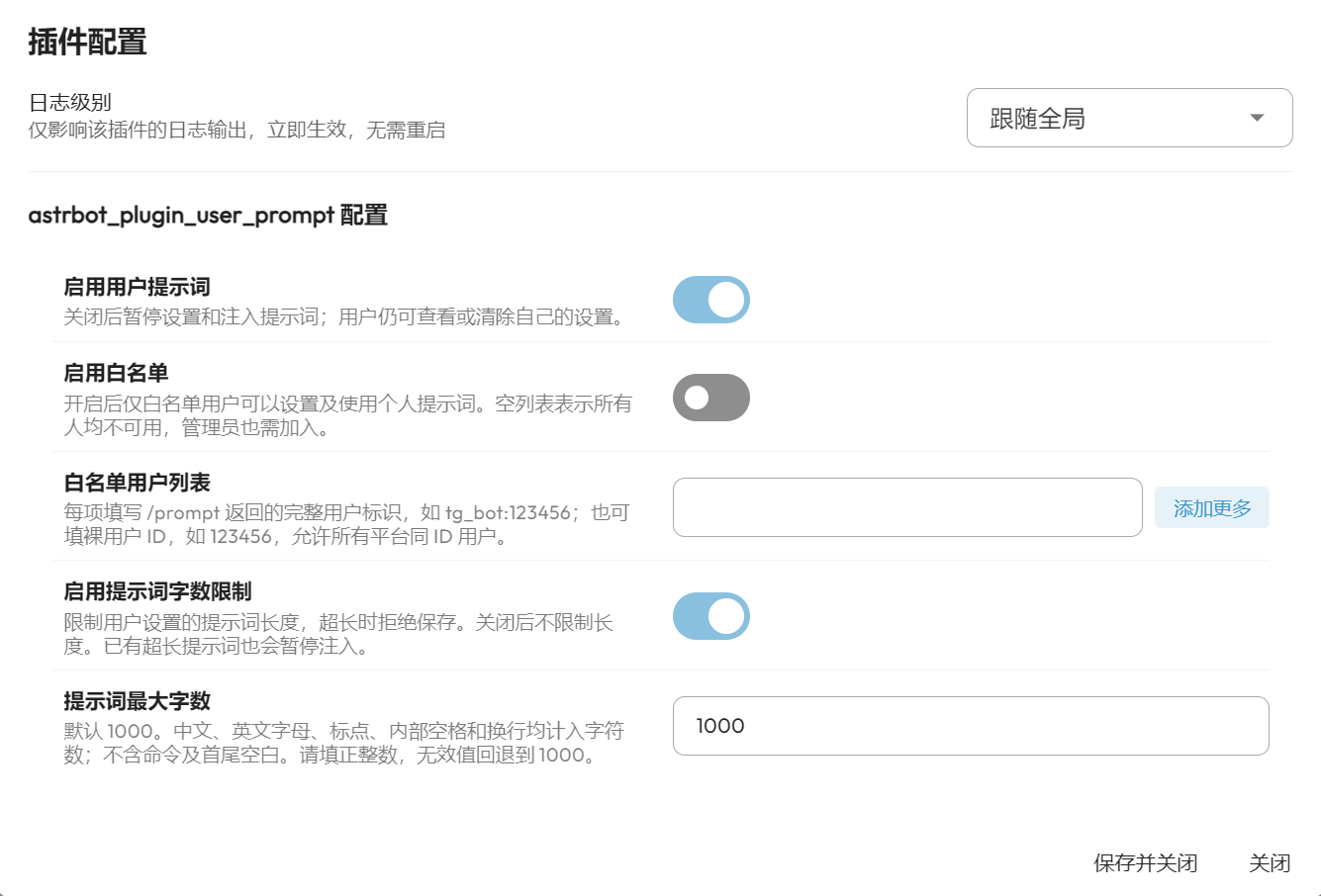
Access and length settings
You can enable an allowlist to choose who may set and use a personal prompt. It is off by default. If you enable it with an empty list, nobody is allowed—including administrators until they are added.
Use the complete platform/user identifier returned by /prompt, such as tg_bot:123456, for a specific platform instance. A bare ID such as 123456 also matches that ID on other platforms, so the full identifier is the more precise choice. Replace these examples with your actual identifiers.
The length-limit setting is enabled by default at 1,000 characters. Letters, punctuation, internal spaces and line breaks count; the command and whitespace trimmed from the beginning and end do not. This is a character limit, not a word or token allowance. You can change the maximum or disable the limit in the plugin settings. The setting belongs to this plugin; no separate length-limiter plugin is needed.
Remember the token cost
Once saved and active, the personal prompt accompanies each of that user’s AI requests in the current conversation. Longer prompts add more input tokens each time, so they can substantially increase usage. Keep that in mind when choosing a maximum length; the resulting bill depends on the model provider’s pricing and caching rules.
Translated from the original Chinese article, published October 25, 2026. Original screenshot retained; command flow, conversation scope and configuration details checked against the project’s README and source.
Comments NOTHING